Playdate_Api_SDL2
An attempt to reimplement the Playdate Handheld C Api in SDL2
Project maintained by joyrider3774 Hosted on GitHub Pages — Theme by mattgraham
Playdate Api SDL2
An attempt to reimplement the Playdate Handheld C Api in SDL2
I attempted to reimplement the Playdate API headers in SDL2, I’ve used this to create windows (and linux) binaries to for my playdate game’s from unaltered source code for the playdate. It’s probably done in a very bad way but it does seem to work for my games and other games on github.
Implemented
Graphics:
- Bitmap operations — load (gif if sdl2image is new enough), new, free, copy, clear, getBitmapData (converts to 1bpp), rotate, scale, tile, drawBitmap, drawScaledBitmap, drawRotatedBitmap, tileBitmap
- Primitives — drawLine, fillRect, drawRect, fillTriangle, fillPolygon, drawEllipse, fillEllipse, drawRoundRect, fillRoundRect (all via drawBitmapAll)
- Stencil — applied in drawBitmapAll (covers all primitives and bitmap drawing, but not fnt drawText)
- getFrame / getDisplayFrame — (raw 1bpp frame buffer access implemented) Fully Works for Standalone getFrame games Works for games using both playdate api draw functions and buffer drawing but don’t edit the buffer after drawing using api (like they use the api drawing as a layer on top) Does not work for games using GetFrame then draw using API Function on top then use GetFrame again to edit the frame buffer (including things drawn using api) but this is very uncommon
- Context — push/pop, draw mode, clip rect, draw offset, background color, tracking, leading
- Fonts — native .fnt + TTF, drawText, getTextWidth, getFontHeight, drawTextInRect, getTextHeightForMaxWidth
- Bitmap tables — new, free, load, getTableBitmap, getBitmapTableInfo
- copyFrameBufferBitmap — returns copy of screen bitmap
- getDisplayBufferBitmap — returns the screen bitmap directly (no copy)
System:
- buttons
- crank (simulated by 2 buttons rotating 5 degrees in a certain directions or controlled by a joystick)
- setPeripheralsEnabled & Accelerometer (controlled by a joystick)
- timer (elapsed/epoch/ms)
- memory (realloc/formatString)
- menu items (Fake menu system implemented with standard/checkmark/options/setMenuImage)
- datetime conversion
- delay
- setButtonCallback (not exactly the same as on device but might work)
Sound:
- FilePlayer and SamplePlayer (load/play/stop/volume/loop/rate via SDL_mixer + AudioStream resampling), AudioSample (load ogg/mp3/wav)
Sprites:
- full lifecycle
- image
- Z-order
- draw mode
- flip
- visibility
- stencil
- tags
- collision world (checkCollisions, moveWithCollisions, all query functions)
File:
- all operations (open/close/read/write/flush/tell/seek/stat/mkdir/unlink/rename/listfiles)
JSON:
- Decoder (decode, decodeString) — fully implemented using nlohmann JSON walks the parsed tree and fires all decoder callbacks (willDecodeSublist, didDecodeSublist, didDecodeTableValue, didDecodeArrayValue, shouldDecodeTableValueForKey, shouldDecodeArrayValueAtIndex, decodeError) for nested objects and arrays
- Encoder (initEncoder) — fully implemented streaming writer that calls the game-provided writeStringFunc supports all scalar types (null, bool, int, double, string with escaping), tables/objects, arrays, pretty-printing with indentation, and comma separation
Not Implemented
Graphics:
- setColorToPattern — empty no-op (LCDPattern colors never substituted)
- checkMaskCollision — always returns 0
- getFontPage / getPageGlyph / getGlyphKerning — return NULL/0
- makeFontFromData — returns NULL
- Stencil on fnt drawText — not applied (draws directly, bypasses drawBitmapAll)
- tilemap sub-API — newTilemap returns NULL, all ops empty
- video sub-API
- videostream sub-API
System:
- getLanguage — hardcoded English, ignores system locale
- getBatteryPercentage / getBatteryVoltage — hardcoded 100% / 5.0V
- getFlipped, getReduceFlashing — always 0
- setAutoLockDisabled, clearICache — empty no-ops
- restartGame, getLaunchArgs, sendMirrorData, setSerialMessageCallback — empty/hardcoded
Sound:
- PDSynth — all functions empty, produces no sound
- PDSynthLFO, PDSynthEnvelope, PDSynthSignal, PDSynthInstrument — all empty
- SequenceTrack / SoundSequence — note events not triggered
- All audio effects (TwoPoleFilter, OnePoleFilter, BitCrusher, RingModulator, DelayLine, Overdrive) — setters empty, no DSP
Other:
- Lua API — non-functional (all calls return 0/error)
- Scoreboards — all return -1
- Network/HTTP — not present
how to
- place your playdate game’s unaltered source code files inside src/srcgame (so the contents of your “src” folder)
- place your playdate game’s Source directory (containing assets) inside Source (so the contents of your “Source” folder) + make sure it contains a pdxinfo file with a bundleID set (it’s used to determine unique save folder)
-
OPTIONALLY (fnt loading is now supported, ttf no longer required): Convert fonts (fnt+png) files to TTF files: by using bitsnpicas to export to BDF file, then open BDF file in fontforge studio and export to ttf. So that the ttf font files match exactly as on the playdate, the export from bitsnpicas to ttf does not help here as it does not export in same size fonts as used on playdate.
Another more easier way to convert the playdate fnt files to loadable ttf files with same size is to open the playdate font in bitsnpicas and then inside bitsnpicase export the font as a windows 3.1 fnt file. Then rename the fnt files to .ttf. (recent) SDL2_ttf (versions) seems to be able to load these fonts as well.
- Compile using the provided makefile.
- If all goes well compiled binary should be named game(.exe) in Source directory
colorize your games
if you place a “Source1” or “Source2”, … folder inside the “Source” folder you can swap source folders by press F3 when the game is running. inside these additional source folders, you replicate the same folder structure as in the original Source folder but you can use different files for example colorized graphics. in order for this to work correctly you need to make sure that you implemented the kEventTerminate event and free your game’s assets / alloced memory when it’s called, otherwise you’ll have memory leaks. It works by first calling kEventTerminate and then kEventInit again so you need to make sure that you also reset global variables inside kEventInit. you can also provide a colors.ini file to determine the colors used for black and white. You need to make sure that the clear color lies between black and white. For an example on this i suggest to check some of my playdate game repo’s.
Simple palette swaps using only colors.ini
Besides creating new assets folders you can also just created “SourceX” folders with a colors.ini for simple palette swaps. Here is an example palette swap for gameboy color graphics.
The rules are that Black < BlachThreshold < Clear < Whitethreshold < White and the thresholds should be near the clear color.
pd_api_gfx_color_force_black_white=1 is what makes graphics be converted to 1 bit graphics setting it 0 will retain original assets like if you want to replace assets with colored assets but still use
different colors for main api drawing functions
pd_api_gfx_color_clear_r=100
pd_api_gfx_color_clear_g=110
pd_api_gfx_color_clear_b=68
pd_api_gfx_color_white_r=168
pd_api_gfx_color_white_g=182
pd_api_gfx_color_white_b=104
pd_api_gfx_color_black_r=15
pd_api_gfx_color_black_g=56
pd_api_gfx_color_black_b=15
pd_api_gfx_color_whitetreshold_r=102
pd_api_gfx_color_whitetreshold_g=112
pd_api_gfx_color_whitetreshold_b=70
pd_api_gfx_color_blacktreshold_r=98
pd_api_gfx_color_blacktreshold_g=108
pd_api_gfx_color_blacktreshold_b=66
pd_api_gfx_color_force_black_white=1
credits
- Playdate api headers (contained in PD_API directory) are copyright by panic inc
- bump.hpp by Polynominal (https://github.com/Polynominal/bump.hpp)
- nlohmann json (https://github.com/nlohmann/json)
- menu system / code is based on cranked emulator implementation (https://github.com/TheLogicMaster/Cranked)
Showcase video
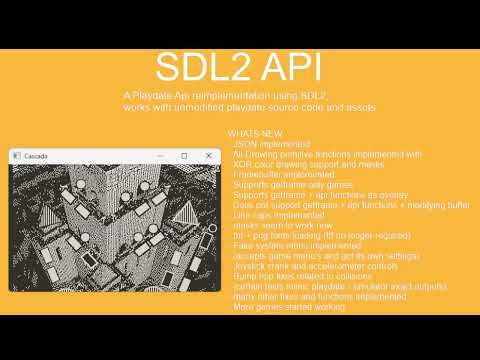
example games
- collection of playdate games, including mine compiled with this api for html: https://joyrider3774.github.io/playdate_games_html/
- Poker Poker Magic: https://rapcal.itch.io/poker-poker-magic