sokoban_embedded
A Sokoban engine for embedded systems, consoles and handhelds
Project maintained by joyrider3774 Hosted on GitHub Pages — Theme by mattgraham
Sokoban Embedded Version




Sokoban is a remake of the classic sokoban game.
You as the player need to push boxes to specific locations in the level. Once all boxes are pushed to the correct spots the level is finished.
The game comes with 19 built in level packs, made from ascii (.sok) level sets, with a total amount of nearly 2000 levels. The game also has an undo system for the last 25 moves.
Screenshots
The browser build, at twice the game’s own 128x128:
| Title screen | In game |
|---|---|
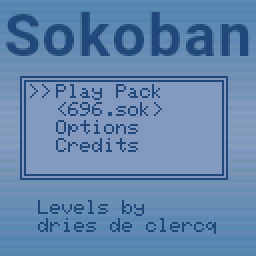 |
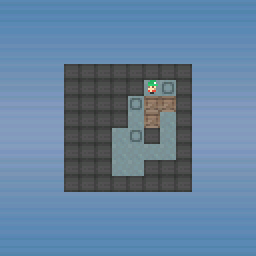 |
Game Features:
- 19 level packs with about 2000 levels
- Max 25x16 level size, levels that are too big are left out
- Undo System for the last 25 moves
- 2 skins to choose from (default and black & white)
- Sound can be switched on or off
- Free view mode to look around levels that are bigger than the screen
- Autosaves progress per level pack
Playing the Game:
Sokoban will start up at a main menu, here you can choose the level pack you wish to play by using left and right when the level pack name is selected (it’s between “<>” signs). If you are new to Sokoban i suggest that you play the “SokWhole” level pack first since these are not so hard to solve. When a level pack is loaded the level selector will show up. Here you select what level you wish to play, if it has been unlocked yet. After you solved a level one extra level will be unlocked. you always have to solve to last unlocked level in order to unlock the next one.
Adding level packs
Level packs are built into the game. To add one, put its .sok file in assets/levelpacks, run python tools/convert_levelpacks.py and add the pack to the level pack table in the source before building the game again.
Controls
| Button | Action |
|---|---|
| DPAD | Select menu’s, options, level packs or levels. Move the player in game, pan around the level in free view |
| A | Confirm in menus, level selector and questions asked. Hold it in game to undo moves |
| B | Back in options and level selector, ask to quit to the level selector in game, leave free view |
| L | Ask to restart the level |
| R | Enter or leave free view |
| (A) + Left + Down | Show or hide the debug info |
Buttons
The game’s buttons on every device:
| Device | D-pad | A | B | L | R |
|---|---|---|---|---|---|
| ESPboy | d-pad | ACT | ESC | LFT | RGT |
| Gamebuino META | d-pad | A | B | MENU | HOME |
| Adafruit PyBadge | d-pad | A | B | SELECT | START |
| Adafruit PyGamer | joystick | A | B | SELECT | START |
| Pimoroni PicoSystem | d-pad | A | B | Y | X |
| Pimoroni Explorer | A up, C down, B left, Y right | X | Z | BOOT + B | BOOT + Y |
| Pimoroni Tufty 2350 | UP up, DOWN down, A left, C right | B | HOME | HOME + A | HOME + C |
| TinyCircuits Thumby Color | d-pad | A | B | left bumper | right bumper |
| Playdate | d-pad | A | B | menu: restart | menu: free view |
| Libretro | d-pad | A | B | L | R |
| Game Boy Advance | d-pad | A | B | L | R |
| Nintendo DS | d-pad | A | B | L | R |
| Nintendo 3DS | d-pad or circle pad | A | B | L | R |
| Nintendo 64 | d-pad | A | B | L | R |
| PlayStation | d-pad | Cross | Circle | L1 | R1 |
| PlayStation Portable | d-pad or the analog stick | Cross | Circle | L | R |
| PlayStation Vita | d-pad or the left stick | Cross | Circle | L | R |
| Windows | arrow keys | X | C | S | D |
| MS-DOS | arrow keys | X | C | S | D |
| Browser | arrow keys | X | C | S | D |
On the Explorer BOOT is held as a shift, the direction pressed with it is not sent.
On the Tufty 2350 a tap of HOME is B when it is let go, held HOME is a shift like BOOT on the Explorer.
On the Gamebuino META holding HOME for a second goes back to its loader.
Devices
Every release has a build for every device. releases/ is where a build of your own puts them, it is not part of the repository:
| Device | File | How to install |
|---|---|---|
| ESPboy | ESPboy_Sokoban.bin | flash it, the board is a LOLIN(WEMOS) D1 mini |
| Gamebuino META | GamebuinoMeta_Sokoban.zip | unzip it onto the SD card, it holds a Sokoban_embedded folder with the game, its save and the loader’s images, the .hex in it is for flashing the game directly |
| Adafruit PyBadge | PyBadge_Sokoban.uf2 | double press reset and copy it onto the drive that appears |
| Adafruit PyGamer | PyGamer_Sokoban.uf2 | same as the PyBadge |
| Pimoroni PicoSystem | PicoSystem_Sokoban.uf2 | hold X while switching on and copy it onto the drive that appears |
| Pimoroni Explorer | Explorer_Sokoban.uf2 | hold BOOT while pressing RESET and copy it onto the drive that appears |
| Pimoroni Tufty 2350 | Tufty_Sokoban.uf2 | hold HOME while pressing RESET and copy it onto the drive that appears |
| TinyCircuits Thumby Color | ThumbyColor_Sokoban.uf2 | put it into bootloader mode and copy it onto the RPI-RP2 drive that appears |
| Playdate | Playdate_Sokoban.pdx.zip | unzip it and sideload Sokoban.pdx, the same pdx runs in the Playdate simulator |
| Libretro / RetroArch | Libretro_Sokoban.zip | copy sokoban_libretro.dll into RetroArch’s cores folder and sokoban_libretro.info into its info folder, then Load Core and Start Core |
| Game Boy Advance | GBA_Sokoban.gba | put it on a flash cart or open it in an emulator, the progress is saved in the cartridge’s SRAM |
| Nintendo DS | NDS_Sokoban.nds | put it on a flash card or open it in an emulator, the progress is saved next to it in Sokoban.sav |
| Nintendo 3DS | 3DS_Sokoban.3dsx | copy it into /3ds/ on the SD card and start it from the Homebrew Launcher, or open it in an emulator, the progress is saved in sdmc:/3ds/Sokoban/ |
| Nintendo 64 | N64_Sokoban.z64 | put it on a flash cart or open it in an emulator, the progress is saved in the cartridge EEPROM |
| PlayStation | PSX_Sokoban.exe | open it in an emulator or send it to a console that runs unsigned code, the progress is not saved yet |
| PlayStation Portable | PSP_Sokoban.PBP | rename it to EBOOT.PBP and put it in ms0:/PSP/GAME/Sokoban/ on the memory stick, or open it in PPSSPP |
| PlayStation Vita | Vita_Sokoban.vpk | install it with VitaShell on a Vita with homebrew enabled, or open it in Vita3K |
| CHGame | CHGame_Sokoban.bin and SOKOBAN.DAT (and CHGame_Sokoban.chgame) |
flash it over USB with the chgame-upload that comes with the board package: chgame-upload -port COM6 flash CHGame_Sokoban.bin -run, and copy SOKOBAN.DAT into the root of the microSD card. The game’s pictures and its levels are both on that card and it draws nothing without it: it says so on a screen of its own and stops. Copy the file to a freshly formatted card if it says the file is in too many pieces. One binary holds all nineteen level packs. A .chgame cart of the same build is written beside them, CHGame_Sokoban.chgame: one file holding the program, the card file, its cover picture and the game’s details, in the format that repository’s spec/chgame.md sets out. Install it from a clone of CHGame. On to the SD card, which is how the console installs it from its own menu: python tools/chgame.py cart prepare CHGame_Sokoban.chgame cardfiles writes the game as a .CHG under GAMES/, the menu’s own files beside it and SOKOBAN.DAT in the root, and you copy everything in cardfiles to the card’s root. cart deploy CHGame_Sokoban.chgame --card E:\ --no-flash writes straight to a mounted card instead, without the menu’s files. Over USB: cart deploy CHGame_Sokoban.chgame --port COM6, which flashes it and writes its card file in one go when --card is given too. The .bin and the .DAT above are all you need to do it by hand instead. |
| Windows | Windows_Sokoban.exe | runs on its own, the progress is saved next to it in Sokoban.sav |
| MS-DOS | DOS_Sokoban.zip | unzip SOKOBAN.EXE onto a DOS machine or into DOSBox and run it, the progress is saved next to it in SOKOBAN.SAV |
| MS-DOS, not dithered | DOS_Sokoban_ND.zip | the same program with DITHERING 0, unzip SOKOB_ND.EXE and run it the same way. On a 256 colour screen a shade the palette has no colour for is the nearer one it does have, instead of a pattern of the two |
| Browser | Web_Sokoban.zip | upload it to an itch.io HTML project, or unzip it and open index.html from a web server, the progress is saved in the browser |
The Tufty 2350 has no speaker, the game is silent there. Holding RESET until the rear LEDs are dark puts it to sleep, a front button wakes it up again, with UP and DOWN held as well it goes into shipping mode instead.
The Thumby Color’s display is 128x128, the game’s own size, so it is shown 1:1 over the whole screen. That build has not been tried on the device itself yet.
The Playdate shows the black & white skin, scaled up in the middle of its display. It has no side buttons, L and R are the restart and free view entries of its system menu.
The Game Boy Advance shows the game scaled to 160x160 in the middle of its screen, with black bars at the sides. Scrolling around a level that is bigger than the screen is slow there: the game engine draws the whole screen again while the view moves.
On the Nintendo DS the game is scaled to 192x192 in the middle of the top screen, with black bars at the sides, and the bottom screen stays dark. What the game saves goes into Sokoban.sav on the card it was started from, so a card that libfat can not write to (or an emulator without one) plays the game but forgets it afterwards. Its tones are square waves played as a sample: the DS’s own tone channels count their frequency in a 16 bit timer and can not go below about 256 Hz.
On the Nintendo 3DS the game is scaled to 240x240 in the middle of the top screen, with black bars at the sides, and the bottom screen stays dark. What the game saves goes into sdmc:/3ds/Sokoban/Sokoban.sav. Its tones play through the console’s DSP when the DSP firmware has been dumped to the SD card (sdmc:/3ds/dspfirm.cdc), and through CSND when it has not: on hardware either one plays, in an emulator only the DSP one does.
On MS-DOS the game runs in VGA mode X, 320x240 in 256 colours, blown up to 240x240 in the middle of the screen with black bars at the sides. That mode rather than the usual 320x200 one because its pixels are square, where 320x200 is stretched over the same screen and would show the game a fifth too tall. The 256 colours are set to the RGB332 cube, which is exactly what the game’s 8 bpp screen buffer holds, so a frame reaches the card without a colour being worked out. Its tones are a square wave on the PC speaker, the progress is saved next to the program in SOKOBAN.SAV, and Escape quits. The program is 32 bit and carries the CWSDPMI host inside it, so it needs nothing beside it on the disk.
In a browser the game is drawn into a canvas of its own 128x128 pixels, which the page stretches to whatever room it is given while keeping it square and keeping the pixels sharp. The progress is saved in the browser’s localStorage under the game’s name, so a private window plays it but forgets it afterwards. The zip holds index.html, index.js and index.wasm and is what an itch.io HTML project takes as it is.
On the Nintendo 64 the game is drawn into memory in the colours the RDP takes and the RDP shows it scaled to 240x240 in the middle of its 320x240 screen, with black bars at the sides. Its tones are a square wave written into the buffers the sound hardware plays from. The progress is saved in the cartridge EEPROM, which the ROM says it has, so a cartridge or an emulator without one plays the game but forgets it afterwards.
On the PlayStation the game is drawn into memory in the colours the GPU takes, handed to it as a texture and shown scaled to 240x240 in the middle of its 320x240 screen, with black bars at the sides. Its tones are a square wave the SPU plays from a single looping block. The memory card is not written yet, so what the game saves is gone when the console is switched off.
On the PlayStation Portable the game is doubled to 256x256 in the middle of the display, and the high scores are saved next to the EBOOT.PBP in Sokoban.sav.
On the PlayStation Vita the game is blown up four times to 512x512 in the middle of the display, and the high scores are saved in ux0:data/Sokoban/Sokoban.sav.
Building
python tools/build_releases.py builds a release for every device
python tools/convert_skins.py turns the images in assets/skins and assets/skins2 into the headers the game includes
python tools/convert_levelpacks.py does the same for the level packs in assets/levelpacks
Where the tools are
The script looks for everything in the place it is installed in here. A tool somewhere else is passed on the command line, or set as the environment variable in the last column and left off the command line:
| Option | What it points at | Default, or environment variable |
|---|---|---|
--arduino-cli PATH |
arduino-cli, which builds the Arduino devices | ARDUINO_CLI |
--arduino DIR |
the Arduino IDE 1.8 folder, used when there is no arduino-cli | C:/arduino, ARDUINO_DIR |
--arduino2 DIR |
the Arduino IDE 2 folder, whose own arduino-cli builds the CHGame | C:/arduino2, ARDUINO2_DIR |
--lovyangfx DIR |
LovyanGFX for the Windows build, when it is not the one in the sketchbook | LOVYANGFX_DIR |
--msys2 DIR |
MSYS2’s mingw64 bin folder, for cmake and ninja | C:/msys64/mingw64/bin, MSYS2_BIN |
--playdate-sdk DIR |
the Playdate SDK | C:/playdate/PlaydateSDK, PLAYDATE_SDK_PATH |
--playdate-arm DIR |
the bin folder of the ARM gcc the Playdate needs | PLAYDATE_ARM_BIN |
--libretro-common DIR |
libretro-common | C:/github/libretro-common, LIBRETRO_COMMON_DIR |
--devkitpro DIR |
devkitARM with libgba, libnds, calico, libctru and tools | C:/devkitarm, DEVKITPRO |
--psn00bsdk DIR |
PSn00bSDK | C:/psn00bsdk, PSN00BSDK_PREFIX |
--n64 DIR |
the mips64-elf toolchain with libdragon | C:/n64_dev, N64_INST |
--emsdk DIR |
the Emscripten SDK | C:/github/emsdk, EMSDK |
--dosdev DIR |
DJGPP with CWSDPMI | C:/dos_dev, DOSDEV |
--chgame DIR |
the CHGame source repository, whose tools write the .chgame cart |
C:/github/CHGame, CHGAME_DIR |
--pspdev DIR |
the pspdev toolchain | C:/psp_dev, PSPDEV_DIR |
--vitasdk DIR |
VitaSDK | C:/psvita_dev, VITASDK |
--sdl2-mingw DIR |
SDL2’s mingw package, its x86_64-w64-mingw32 folder | SDL2_MINGW |
Only the devices being built need their tool, so one missing toolchain does not stop the rest:
python tools/build_releases.py --only N64 DOS --n64 D:/n64_dev --dosdev D:/dos_dev
python tools/build_releases.py --list          shows what would be built
python tools/build_releases.py --only Web      one device only
Build settings
Every device is built with its own settings. These change them for all of the devices at once, and --list shows what the defines would be without building anything. They are the same defines the device headers and the platforms/*/CMakeLists.txt files take, so a single device can be built with -D<name>=<value> from cmake instead:
| Option | What it sets | Values |
|---|---|---|
--forceskin N |
FORCESKIN, the skin built in |
-1, or 0 to 1 |
--forcescreenbuffer N |
SCREENBUFFER, where drawing goes |
0, 1, 8 or 16 bits per pixel |
--forcescale N |
SCALESCREEN, how the game fills the display |
1 blown up, 0 1:1 in the middle |
--forcewindowscale N |
WINDOW_SCALE, how big the Windows window opens |
1 to 8 times the game’s size |
--forcedithering N |
DITHERING, whether an 8 or 1 bpp buffer spreads its colours |
1 spread, 0 the nearest colour |
--forcedebug |
FORCEDEBUG 1, the debug header is always shown |
no value, on when it is given |
-1 builds every skin in and lets the game’s own options pick one. A number builds only that skin in, which is what a device short of room needs.
Not every device takes every buffer mode, platforms/<device>/CMakeLists.txt says which, and one it does not take stops that build with a message. A 1 bpp buffer can only show the one skin that is black and white, so it forces that skin whatever --forceskin says, see FORCESKIN in defines.h.
python tools/build_releases.py --forceskin 1                only skin 1, on every device
python tools/build_releases.py --only Windows --forcescreenbuffer 1
python tools/build_releases.py --list --forcedebug          what the defines would be
Board packages and libraries
The Arduino devices are built with arduino-cli 1.5.1 and the versions below. They are the ones every release is built with, .github/workflows/build-releases.yml pins them:
| Device | Board package | Libraries |
|---|---|---|
| ESPboy | esp8266:esp8266 3.1.2 | LovyanGFX 1.1.9, TFT_eSPI 2.4.72 |
| Gamebuino META | gamebuino:samd 1.2.2 | Gamebuino META 1.3.3 |
| Adafruit PyBadge, PyGamer | adafruit:samd 1.7.16 | Adafruit GFX Library 1.12.6, Adafruit ST7735 and ST7789 Library 1.5.15, Adafruit BusIO 1.17.4, Adafruit NeoPixel 1.15.5, Adafruit SPIFlash 5.1.1 |
| PicoSystem, Explorer, Tufty 2350, Thumby Color | rp2040:rp2040 5.5.0 | none, everything they use comes with the core |
| CHGame | CHGame:ch32v 0.3.0 | none, the core brings its own riscv-none-embed-gcc |
The ESPboy draws through LovyanGFX and only includes TFT_eSPI’s header, so the exact TFT_eSPI does not matter much.
The Gamebuino’s core needs Arduino’s own arduino:samd 1.8.14 beside it for sam.h, without it the build stops at “sam.h: No such file or directory”.
The CHGame’s board package is only published for the Arduino IDE 2, so that device is built with the
arduino-cli that IDE 2 ships (--arduino2) while the rest use the IDE 1.8 folder, in the same run.
Its CH32X035 has 50944 bytes of flash for the game and 20464 bytes of RAM, so it builds the black &
white skin alone and nothing else: every picture is packed one bit a pixel instead of as RGB565,
which is what makes the game fit at all. See FORCESKIN and ONEBITIMAGES in defines.h and
source/*/PlatformCHGame.h.
The released build reads its art off the microSD card instead (CARDIMAGES, see cardimages.h),
which changes what the device can hold:
- both skins are on the card in full RGB565 and can be picked in the options, instead of the one black & white skin a flash build has room for;
- one binary holds all nineteen level packs instead of nine binaries holding eleven of them between them, the levels being read off the card too. The eight packs that were too large for a binary at all are on the device for the first time, and the game sits at 85% of the flash.
The card file is SOKOBAN.DAT, written into releases/ by tools/mkcard.py as part of the build and
released beside the binary. It holds a section per kind of data, so what the game later wants from
the card goes in beside the art rather than in a file of its own. A picture whose rows are each one
colour is kept as one colour a row rather than as pixels, which is what makes a plain background
cost nothing. The reader is CHSd, which the board package ships; a flash build needs none of it.
See source/*/PlatformCHGame.h for the switch and tools/mkcard.py for what is on the card.
The levels are on the card as well, all nineteen packs, in a section of their own beside the
art. They go in exactly as flash held them, run length encoded by the game’s own
tools/convert_levelpacks.py, and the game’s reader walks one from the card a piece at a time
instead of through a pointer: nothing of a pack is held in RAM that was not held before. See
CARD_HAS_LEVELS in cardindex.h and the LVLS section in tools/mkcard.py.
The Windows build draws through the same LovyanGFX 1.1.9, see platforms/windows/CMakeLists.txt.
Toolchains
The Playdate build also needs the Playdate SDK, see platforms/playdate/CMakeLists.txt
The libretro core needs libretro-common, see platforms/libretro/CMakeLists.txt
The Game Boy Advance build needs devkitARM and libgba, see platforms/gba/CMakeLists.txt
The Nintendo DS build needs devkitARM, libnds and calico, see platforms/nds/CMakeLists.txt
The Nintendo 3DS build needs devkitARM and libctru, see platforms/3ds/CMakeLists.txt
The PlayStation build needs PSn00bSDK, see platforms/psx/CMakeLists.txt
The Nintendo 64 build needs the mips64-elf toolchain and libdragon, see platforms/n64/CMakeLists.txt
The PSP build needs the pspdev toolchain, see platforms/psp/CMakeLists.txt (pspdev has no Windows build, so on Windows it is built from WSL)
The Vita build needs VitaSDK, see platforms/vita/CMakeLists.txt
The browser build needs Emscripten, see platforms/web/CMakeLists.txt
The MS-DOS build needs DJGPP, see platforms/dos/CMakeLists.txt
Credits
Game is an adaptation from the gp2x version i (willems davy, aka joyrider3774) initially made many years ago
Graphics
- wall (adapted): 1001.com - Attribution-ShareAlike 3.0 Unported
- floor (adapted): Kenney Sokoban tiles - CC0 1.0 Universal
- player (adapted): Kenney Sokoban tiles - CC0 1.0 Universal
- box (adapted): SpriteAttack boxes and crates - CC0 1.0 Universal
Level (pack) Authors
The Game uses Levels created by different Authors almost all levelpacks are loaded through level set sok files.
I used the sok files available for download on http://sokobano.de/en/levels.php as they contained the Authors as well as the title of the levels and comments in the files. I implemented a parser for these levels so they can now be used with the game.
Back when i initially created the game for the gp2x i had my own format and this is still used when people create their own levels (inside the game). One such level pack that is still available like this is the “pimpernel” level pack.
Below you can find all authors and details for the different .sok files that is supplied with this game.
696.sok
- Author: Dries de Clercq
Minicosmos.sok
- Author: Aymeric du Peloux
- Homepage: https://aymericdupeloux.wixsite.com/sokoban
Microcosmos.sok
- Author: Aymeric du Peloux
- Homepage: https://aymericdupeloux.wixsite.com/sokoban
Nabokosmos.sok
- Author: Aymeric du Peloux
- Homepage: https://aymericdupeloux.wixsite.com/sokoban
Picokosmos.sok
- Author: Aymeric du Peloux
- Homepage: https://aymericdupeloux.wixsite.com/sokoban
Cosmopoly.sok
- Author: Aymeric du Peloux
- Homepage: https://aymericdupeloux.wixsite.com/sokoban
Myriocosmos.sok
- Author: Aymeric du Peloux
- Homepage: https://aymericdupeloux.wixsite.com/sokoban
Cosmonotes.sok
- Author: Aymeric du Peloux
- Homepage: https://aymericdupeloux.wixsite.com/sokoban
GRIGoRusha 2001.sok
- Author: Evgeniy Grigoriev (GRIGoRusha)
- Homepage: http://grigr.narod.ru/
GRIGoRusha 2002.sok
- Author: Evgeniy Grigoriev (GRIGoRusha)
- Homepage: http://grigr.narod.ru/
GRIGoRusha Remodel Club.sok
- Author: Evgeniy Grigoriev (GRIGoRusha)
- Homepage: http://grigr.narod.ru/
GRIGoRusha Special.sok
- Author: Evgeniy Grigoriev (GRIGoRusha)
- Homepage: http://grigr.narod.ru/
GRIGoRusha Star.sok
- Author: Evgeniy Grigoriev (GRIGoRusha)
- Homepage: http://grigr.narod.ru/
GRIGoRusha Sun.sok
- Author: Evgeniy Grigoriev (GRIGoRusha)
- Homepage: http://grigr.narod.ru/
SokEvo.sok
- Author: Lee J Haywood
- Homepage: https://ljhaywood.uk/games/sokoban/
SokHard.sok
- Author: Lee J Haywood
- Homepage: https://ljhaywood.uk/games/sokoban/
SokWhole.sok
- Author: Lee J Haywood
- Homepage: https://ljhaywood.uk/games/sokoban/
LOMA.sok
- Author: Lee J Haywood
- Homepage: https://ljhaywood.uk/games/sokoban/
Erim Sever Collection.sok
- Author: Erim Sever
- Homepage: https://web.archive.org/web/20191029215423/http://www.erimsever.com/e_sokoban.htm